01
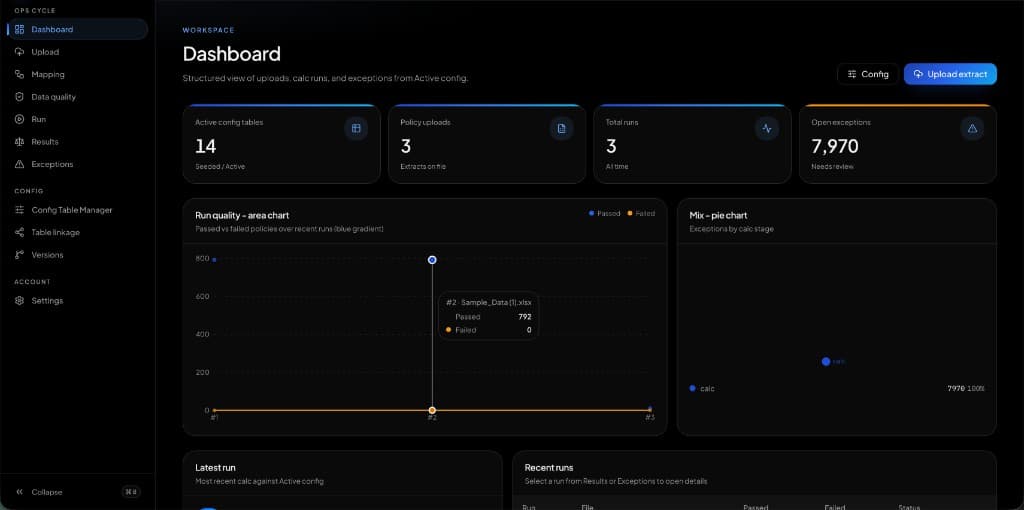
Projects grid
Progress, status, members, and dates across clients.
Portfolio view without a PMO export.
Team and project management, without the drag
Team and project management with tickets, sprints, analytics, and an AI assistant — Jira-class, better to live in.
Everything a client would actually use — not a feature dump, the operating pieces of the system.
Progress, status, members, and dates across clients.
Status, priority, type, assignee, story points, due.
Committed, completed, burndown, velocity, backlog.
Click any screen to open it full size. These are the live product surfaces — dashboards, flows, and themes.
Tickets, sprints, clients, and analytics were split across tools with no AI in the loop.
One dark OS for projects, tickets, sprints, burndown, velocity, and an assistant that can be asked anything.
Leads see work, SLA, and sprint health without leaving the product the team already uses.
Tickets need ID, labels, status, priority, type, assignee, points, and due date.
Committed vs completed only matters with burndown and velocity beside the backlog.
Projects, tickets, kanban, sprints, epics, releases, clients, teams.
Analytics for created vs resolved, category mix, SLA, and productivity.
Ask anything from the sidebar without opening another product.
without the drag
in the sidebar
Teams keep the workflow, lose the fatigue.
“Orbint is what we kept asking Jira to become.”
The core engagement ran for a platform cycle. Discovery and architecture came first, followed by incremental releases and a structured transition into continuous improvement.
React, TypeScript, TanStack and Recharts provided the best balance of team fit, ecosystem maturity, security, delivery speed and long-term operating cost. Every major choice was documented through architecture decisions.
Threat modeling, least-privilege access, automated security checks and observability were built into delivery. Load and failure testing validated the critical paths before launch.
Appzotic provided launch command, operational monitoring, knowledge transfer and a prioritized evolution roadmap. The client could choose continued product support or full internal ownership.
Bring the workflow, the constraint, or the screenshot of what you wish existed. We’ll shape the system around it.